

Technical SEO is the foundation of a well-optimized website. Without proper technical SEO, high-quality content may fail to achieve strong search rankings. Simply put, technical SEO helps search engines crawl, understand, and index your website efficiently.
In this guide, you’ll learn what technical SEO is, why it matters, and how to optimize your website step by step like a pro.
What Is Technical SEO?
Technical SEO refers to optimizing the technical aspects of a website to improve its visibility in search engines. It focuses on making your site easy to crawl, fast to load, secure, and user-friendly.
Unlike on-page SEO or content SEO, technical SEO works behind the scenes. However, it plays a major role in how search engines rank your pages.
Why Technical SEO Is Important
Technical SEO ensures that search engines can access and understand your website without issues. As a result, your pages are more likely to rank higher in search results. Here’s why it matters:
- Helps search engines crawl and index your site properly
- Improves website speed and performance
- Enhances mobile usability
- Strengthens website security
- Improves overall user experience
Without technical SEO, your website may face indexing errors, slow load times, or ranking drops.
How Search Engines Work Behind the Scenes
Before optimizing, it’s important to understand how search engines think. Crawling is when search engines send bots to scan your website pages. These bots follow links like curious ants, moving from one page to another.
Once crawled, pages are stored in Google’s index. Ranking happens when Google decides where your page belongs in search results. If your site has crawl errors, slow speed, or poor structure, Google struggles to rank it properly. SEO removes these roadblocks.
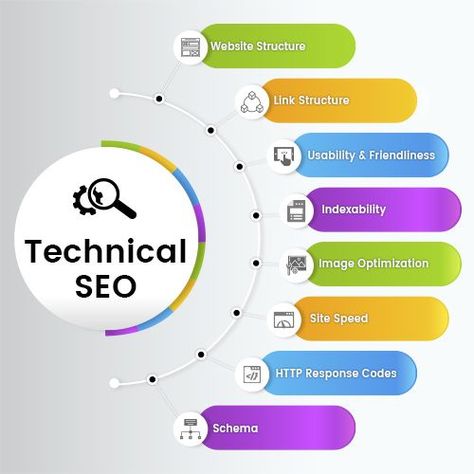
Key Elements of Technical SEO
1. Website Architecture and Structure
A clean site structure is like a well-organized library. Your pages should be logically arranged, with important pages easily accessible within a few clicks.
Internal links guide both users and search engines. Use descriptive anchor text, avoid broken links, and link related content naturally
2. Website Crawling and Indexing
Search engines use bots to crawl your website. If your site blocks these bots, your pages won’t appear in search results.
- Use a clean robots.txt file
- Submit an XML sitemap to Google Search Console
- Avoid broken links and crawl errors
3. Website Speed Optimization
Page speed is a confirmed ranking factor. A slow website can hurt rankings and increase bounce rates.
- Compress images
- Enable browser caching
- Minify CSS, JavaScript, and HTML
- Use a reliable hosting provider
4. Mobile-Friendly Design
Google uses mobile-first indexing, which means it mainly evaluates the mobile version of your website.
- Responsive design
- Readable text without zooming
- Clickable buttons with proper spacing
A mobile-friendly website improves both rankings and user satisfaction.
5. Secure Website (HTTPS)
Website security is essential for technical SEO. HTTPS protects user data and builds trust. If your site still uses HTTP, switch to HTTPS by installing an SSL certificate.
- Better rankings
- Improved trust
- Secure data transfer
6. URL Structure Optimization
Clean and simple URLs help search engines and users understand your content easily.
Good URL example:
yourwebsite.com/technical-seo-guide
Avoid:
- Long URLs
- Random numbers or symbols
- Duplicate URLs
7. Fix Duplicate Content Issues
Duplicate content confuses search engines and can weaken rankings.
- Using canonical tags
- Redirecting duplicate pages
- Avoiding copied content
8. Structured Data (Schema Markup)
Structured data helps search engines understand your content better and can improve your appearance in search results.
- FAQs
- Articles
- Products
- Reviews
Schema can help your site stand out with rich snippets.
Common Technical SEO Mistakes to Avoid
Even small technical errors can affect performance. Therefore, avoid these mistakes:
- Ignoring crawl errors
- Slow page speed
- Not optimizing for mobile
- Missing SSL certificate
- Broken internal links
Regular audits help catch these issues early.
How to Perform a Technical SEO Audit
A technical SEO audit helps you identify and fix hidden issues.
Basic steps:
- Check Google Search Console for errors
- Analyze site speed
- Review mobile usability
- Inspect indexing status
- Fix broken links and redirects
Technical SEO Best Practices
To keep your website optimized long-term, follow these best practices:
- Perform regular technical audits
- Keep your sitemap updated
- Monitor Core Web Vitals
- Maintain clean site architecture
- Fix errors as soon as they appear
Consistency is key when it comes to SEO success.
FAQs
1. Why is technical SEO important for search rankings?
The main goal of SEO is to help search engines crawl, index, and rank your website efficiently.
2. Is technical SEO important for small websites?
Yes, SEO is essential for both small and large websites. Even small sites benefit from better performance and visibility.
3. How often should I check technical SEO issues?
You should review SEO at least once every few months or after major website changes.
4. Can technical SEO improve rankings?
Yes, strong SEO improves website performance, which can directly and indirectly boost rankings.
Final Thoughts
Technical SEO is essential for building a high-performing website. When done correctly, it improves search visibility, performance, and user experience. By following this guide, you can optimize your website like a pro and build a strong foundation for long-term SEO success.